SpaceDub is a five-tap stereo dub delay with a resonant ladder filter in the feedback path. Each channel runs an eight-second delay line read at five taps. The taps are panned by index — the last one hard in its own channel, each earlier one 10 % further toward the centre — so repeats spread across the image as they decay.
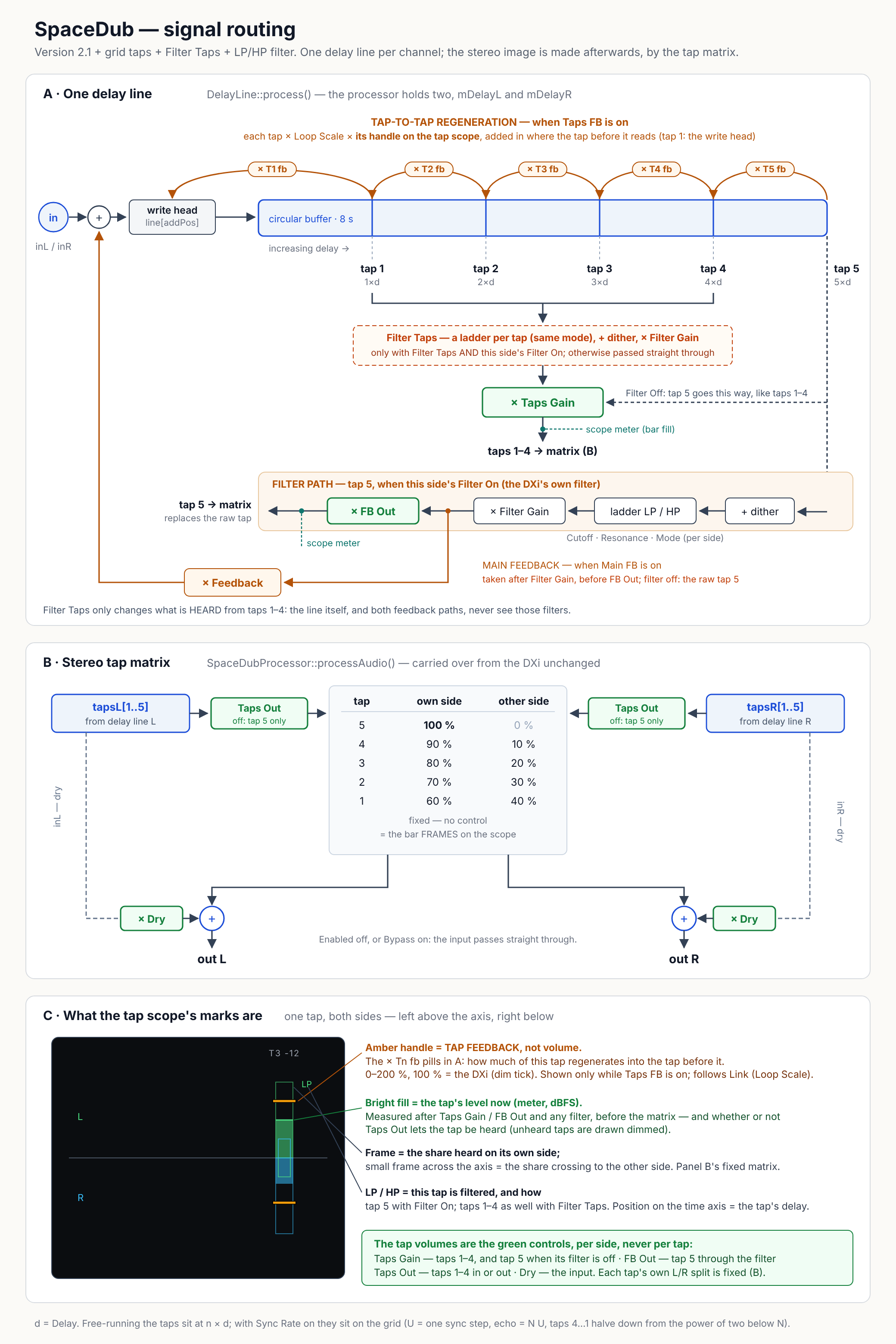
Tap 5 can be routed through a four-pole Moog-style ladder filter with cutoff, resonance and gain, and fed back into the line, which is where the dub-siren sweeps come from. A separate tap-to-tap regeneration path lets each tap feed the one before it.
The delay runs free or locks to the host tempo, quantised to a grid from 1/32 to a whole note. When the host supplies a tempo the delay follows it live, and the panel shows the tempo it is locked to.
This is a port of the 2003 Windows Cakewalk DXi of the same name. The DSP is carried over line by line, so it sounds like the original; four places deliberately differ, and each is recorded in the porting notes.
You can report bugs or request features on the project’s GitHub issues page.
New in 2.2.1.0
Dying echoes no longer eat CPU. With the filter off, every fading repeat spent hundreds of trips round the delay line as “denormal” numbers, far too small to hear but slow to calculate on Intel Macs: the delay took 7× as long at 90 % feedback, and 16× with Taps Feedback on. Anything below 10−30 (−600 dB) is now set to zero where the line is written, and each processing block runs with the CPU's flush-to-zero mode on, putting the host's setting back afterwards. The same two cases now take 168 ms and 208 ms of CPU where they took 715 ms and 2,873 ms.
Nothing you can hear has changed: above that floor the output is bit-identical to 2.2.0.0. Parameters, presets and saved projects are exactly as before.
New in 2.2.0.0
- Taps on the grid. With Sync Rate on, every tap now lands on the beat grid, not just the last. With the echo at N steps of the sync rate, tap 5 sits on exactly N steps and taps 4 to 1 halve down from the power of two below it — at 3 sixteenths, the taps fall at ¼, ½, 1, 2 and 3 sixteenths. Before, taps 1–4 sat at even fifths of the echo, between the notes. Free-running is unchanged.
- High-pass filter. Each side's ladder filter can now be a low-pass or a high-pass, 24 dB per octave either way, with an LP / HP selector under its On switch. Cutoff, Resonance and Gain work the same in both modes; Link Filters links the selectors.
- Filter Taps. Until now only tap 5 went through the filter. A new Taps switch in the Filter section sends taps 1–4 through it too, each through a filter of its own, on any side whose filter is on. It changes what you hear from those taps only — the feedback paths are untouched.
- The tap scope marks every filtered tap LP or HP, and the Filter section's Resonance and Gain knobs have moved slightly left to make room.
A project saved with Sync Rate on will sound different. Its taps 1–4 move onto the grid, and tap 5 moves by a few samples to sit on it exactly. Free-running projects are unchanged, and everything else from earlier versions opens as it was: the new parameters start where the old sound was — Filter Taps off, both filters low-pass. Hosts will list three parameters they did not before: Filter Taps and Filter Mode Left / Right (shown as Low Pass / High Pass).
New in 2.1.0.0
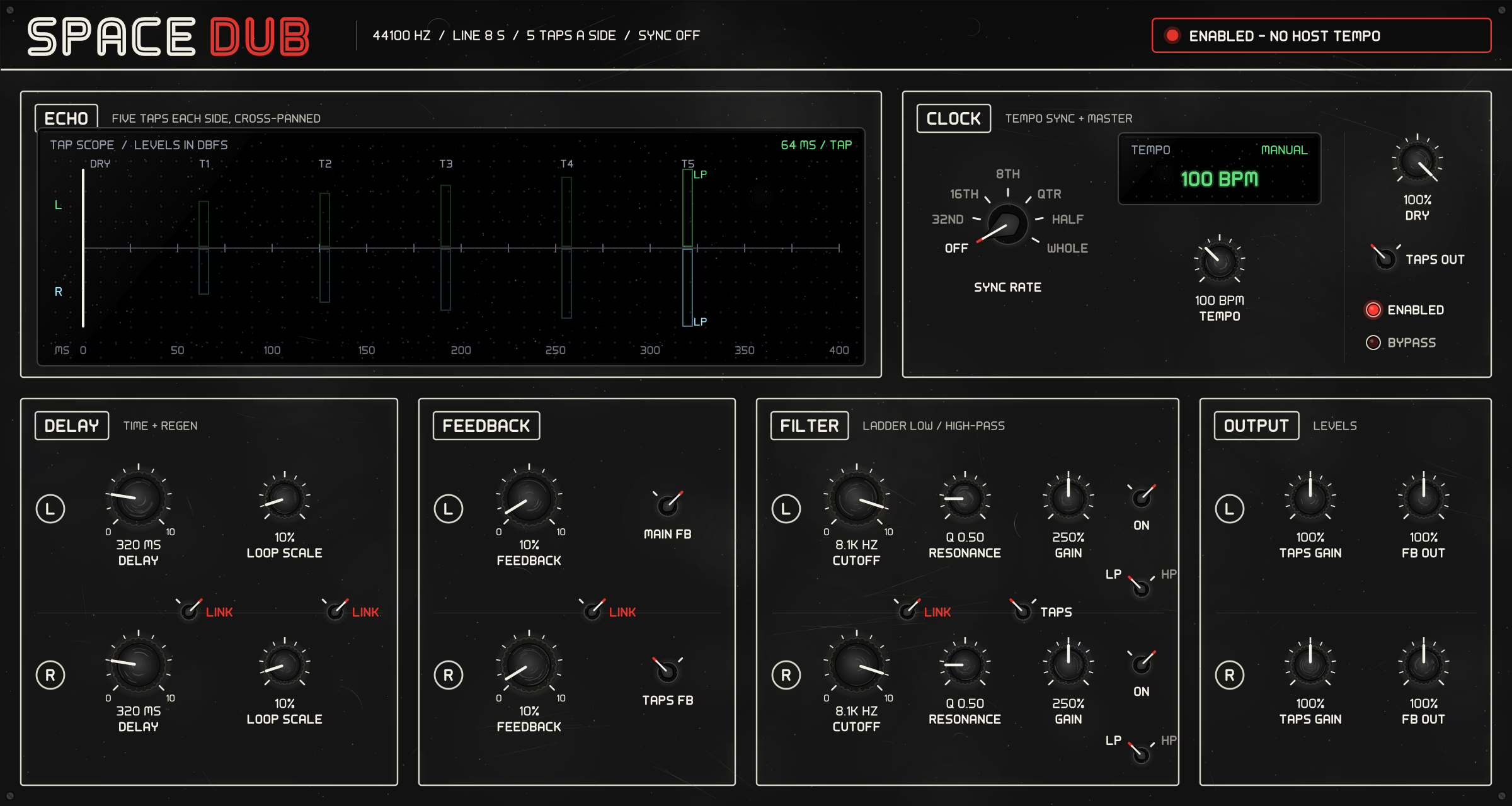
A new panel. The window is now a 1200 × 640 black hardware-style panel — knurled knobs, rotary selectors, small OLED screens — in place of the bitmap copy of the Windows dialog. Every control from before is still there, grouped into Echo, Clock, Delay, Feedback, Filter and Output, with the left channel's row above the right's and the four LINK switches between them.
- The tap scope. A screen in the Echo section draws each channel's five taps where they land in time, how much of each is heard on its own side and how much crosses to the other, and how much signal is going through every tap right now, with its level in dBFS.
- Dry Level replaces Straight Thru. The on/off switch for the dry signal is now a Dry knob, 0–100 %, so you can mix the input in with the echoes rather than only all or nothing.
- A feedback level for each tap. With Taps FB on, an amber handle sits over every tap on the tap scope: drag it to set how much that tap feeds back, 0–200 % of Loop Scale. Link Loop Scale links them left to right.
Projects and presets from earlier versions open unchanged. The plug-in's identity codes are the same. A saved Straight Thru on loads as Dry 100 % and off as 0 %, and every tap's feedback starts at 100 %, which is exactly the old single amount — so an old session sounds as it did. Hosts will list eleven parameters they did not before or under a new name: Dry Level (was Straight Thru) and Tap 1–5 Feedback Left / Right. Some also list ten read-only Tap … Level meters, which the panel uses and which cannot be automated.
New in 2.0.1.0
The maker is now “AE Cobley”, in both formats — it was “A. E. Cobley”. REAPER files an Audio Unit's presets under its name cut off at the first full stop, so every A. E. Cobley Audio Unit shared one REAPER preset list and showed the others' presets, which did nothing when chosen. The plug-in's identity codes are unchanged, so projects saved with earlier versions still open with SpaceDub in place. Hosts that list plug-ins by maker now show it under AE Cobley. Nothing in the sound changed.
After upgrading. Presets you saved in a
host that files them by maker are in
~/Library/Audio/Presets/A. E. Cobley/SpaceDub
— move them to
~/Library/Audio/Presets/AE Cobley/SpaceDub to see them
again. In REAPER, Audio Unit presets you saved earlier stay in its old
shared list; the VST3 is unaffected.
Three things that look like faults and are not
It makes no sound until you switch it on. The
Enabled lamp starts off, exactly as the original
shipped, and the panel's header says so. Until it is lit the plug-in passes audio straight through. This is
the first thing anyone reports.
Filter Gain starts at 250 %. Also as the original shipped. Combined with resonance it is loud by design — bring it down before raising feedback.
Sync Rate has eight entries but seven distinct
values. The DXi's switch mapped both of the last two
to a whole note. Kept, so automation values line up with the original; the
panel prints seven positions.
Four more worth knowing
- Presets saved by the Windows DXi cannot be read. The value ranges and the stream layout both changed in the port; there is no conversion path.
Feedback Outdoes not change how much regenerates. It scales the filtered tap on its way out, after the point where feedback is taken. The routing drawing below shows why — this is inherited from the original, not a bug.- The amber handles on the tap scope are feedback, not volume. Each sets how much its tap regenerates into the tap before it, and shows only while Taps FB is on. A tap's level is set per side, by Taps Gain (and FB Out for the filtered tap 5). The routing drawing below shows where each sits.
- The Cutoff reading is the original's number. The filter's −3 dB point is more than an octave below it, as it always was in the DXi.
Details in the routing that are easy to get wrong
All deliberate:
- The filtered tap leaves through Feedback Out, not Taps Gain — unlike the other four taps.
- Main feedback is tapped after Filter Gain but before Feedback Out, so the amount fed back is not the amount you hear.
- With the filter off, the signal fed back is the raw last tap.
- There are five regeneration paths, not four: the DXi's loop starts at the write head, so tap 1 regenerates into the newest sample.
- Filter Taps filters only what is heard from taps 1–4; the line itself and both feedback paths never see those filters.
- The tap scope's meters are read after the gains and any filter, before the stereo matrix, whether or not Taps Out lets the tap be heard.
Known gaps
- No preset library ships with it; the defaults are the DXi's.
- Free-running, the five taps are evenly spaced; they cannot be offset individually. There is no per-tap level.
Uninstalling
A .pkg never will, so:
sudo rm -rf /Library/Audio/Plug-Ins/VST3/SpaceDub.vst3sudo rm -rf /Library/Audio/Plug-Ins/Components/SpaceDub.component