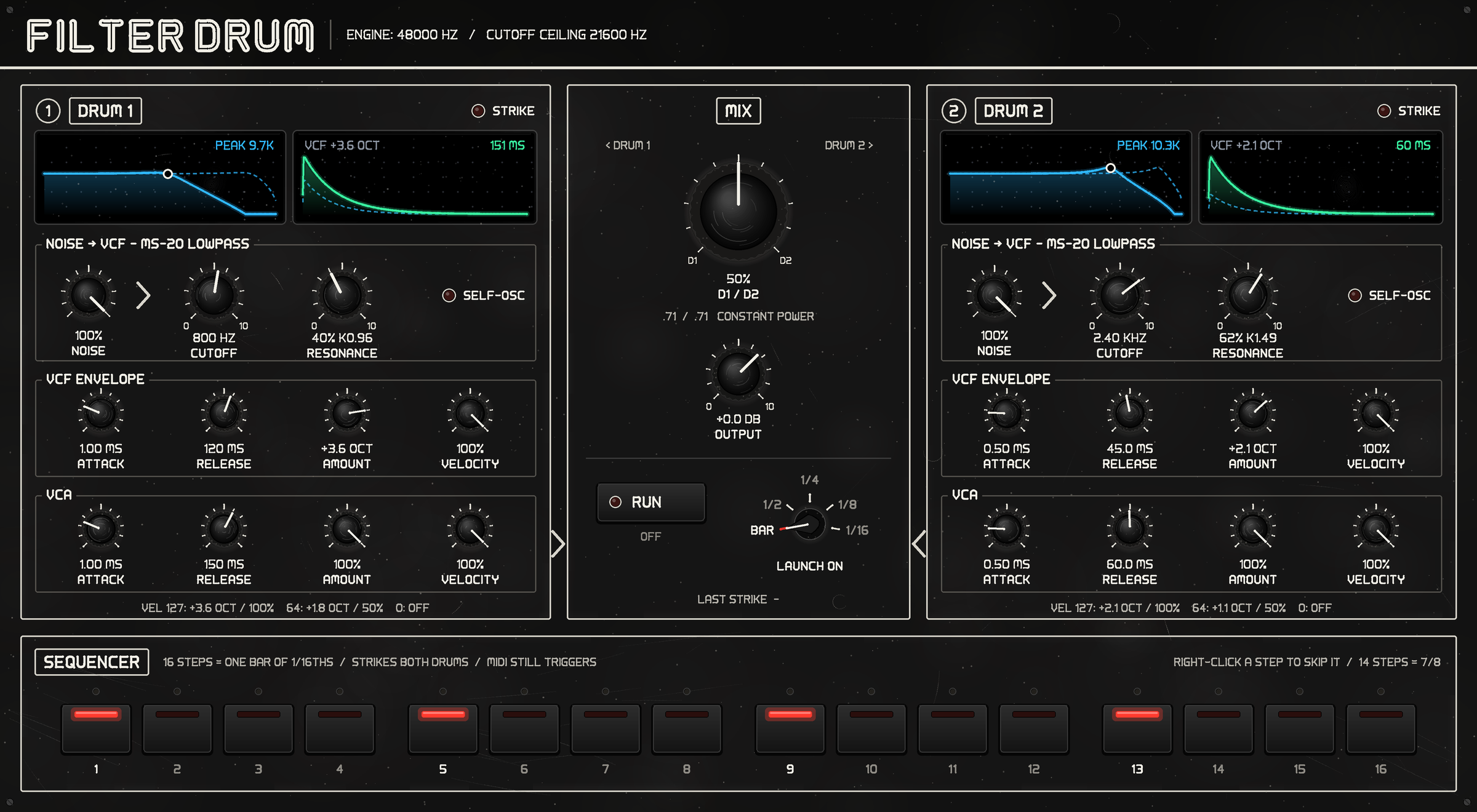
FilterDrum is two monophonic drum voices, struck together. Each is noise through a model of the Korg MS-20 lowpass into a VCA, with an AR envelope on each; a constant-power crossfader blends the two. A sixteen-step sequencer rides the host's bar lines, and MIDI still triggers it.
58 parameters, all automatable. One stereo output, no audio input.
You can report bugs or request features on the project’s GitHub issues page.
New in 1.3.1.0
No more aliasing when the filter screams. At high resonance the MS-20 filter self-oscillates as a clipped sine, and in 1.3.0.0 that sine's upper harmonics folded back below the note: at a 6 kHz pitch, alias tones within 200 Hz of it at −26 and −29 dB. Each drum now runs at twice the host's sample rate and is filtered back down; the same case measures −58.7 dB.
- High self-oscillating pitches are in tune. A side effect of the oversampling: they move to the pitch they should always have had, about 7 cents lower at 4 kHz, 24 at 6 kHz and 33 at 9 kHz. Below 2 kHz the change is under 2 cents.
- Flush-to-zero on the audio thread. Each processing block runs with the CPU's flush-to-zero mode on and puts the host's setting back afterwards, so a signal decaying towards silence can never slow the plug-in down.
What to expect. FilterDrum uses about twice the CPU it did. Sample peaks can come out 0.5–3 dB lower, because band-limited noise has a lower crest factor; the loudness (RMS) does not change, and the noise level is kept to within 0.03 dB. Parameters, automation, presets and saved projects are exactly as in 1.3.0.0. Quit your DAW before installing.
New in 1.3.0.0
A new panel, in R2Synth's look. Matte black with white printing, boxed sections, knurled knobs with printed scales, a chicken-head selector, small colour screens and the 70s sci-fi lettering, with the same worn finish as R2Synth 1.1.
- The two drums sit side by side as mirrored columns that read downward — screens, Noise into the VCF, the VCF envelope, then the VCA — so every control is level with the same control on the other drum. Between them: the D1 / D2 mix (turn towards D1 to favour drum 1), Output, Run, Launch On and the last strike.
- Launch On is a rotary selector with five positions: Bar, ½, ¼, ⅛ and 1/16.
- The step keys are black buttons. A red lens lights for a hit and a white LED above follows the playhead. A disabled step is drawn hollow; right-click (or Ctrl-click) a key to disable it, as before.
- Run is a lit push button, with “armed” or “running” under it.
Nothing about the sound has changed. Parameters, automation, presets and saved projects are exactly as in 1.2.0.0, so upgrading is safe mid-project. Quit your DAW before installing.
New in 1.2.0.0
A new panel
Each drum is now a lane that reads left to right as the signal flows: Noise, then the VCF (Cutoff, Resonance, a Self-Osc lamp and its envelope), then the VCA. Each lane ends in two screens — the filter's response curve, solid at the knobs and dashed at the top of a full-velocity hit, and the two envelopes. A Strike lamp for each drum flashes when it is hit, the sixteen steps are pads, and Run shows whether the sequencer is off, armed or running.
The panel's readings are friendlier: Cutoff reads “2.40 kHz” and the VCF Amount reads in octaves (“+3.6 oct”). The host's own parameter text is unchanged.
Steps can be disabled, for other time signatures
Right-click (or Ctrl-click) a step pad and it leaves the pattern altogether. Disable steps 13–16 and the pattern is twelve sixteenths long — 3/4 inside a 4/4 bar. An off step still takes its sixteenth; a disabled one does not. These are sixteen new automatable parameters, “Step N Disabled”.
The resonance follows the real diode law
The diodes in the resonance path now follow the exponential diode law instead of a smooth tanh curve: clean below the knee, then a sharp corner. High resonance and self-oscillation sound a little harder-edged. Levels are within a fraction of a decibel of 1.1.1.0's, so the output trim did not need to move.
After upgrading. Projects saved with an earlier version open with every step enabled and play the same pattern, but patches with high resonance will sound slightly different because of the new diode curve.
New in 1.1.1.0
The VST3 is now by “AE Cobley”, the same maker
name as the Audio Unit. It was “A. E. Cobley”, so
hosts listed FilterDrum under two different makers depending on the format,
and the two formats' factory presets went into two different folders.
Both now install to one folder,
/Library/Audio/Presets/AE Cobley/FilterDrum.
The sound engine and the plug-in's identity are unchanged, so projects saved with any earlier version open and sound as they did.
Tidying up after an earlier version. The installer does
not delete the old VST3 preset folder,
/Library/Audio/Presets/A. E. Cobley/FilterDrum.
Nothing looks there any more, so it does no harm, but you can remove it
(see Uninstalling). If you saved your
own VST3 presets in a host that files them by maker
— Cubase, for example — they are in
~/Library/Audio/Presets/A. E. Cobley/FilterDrum.
Move them to ~/Library/Audio/Presets/AE Cobley/FilterDrum
and the VST3 lists them again.
New in 1.1.0.0
Five more factory presets — Block,
Hat, Longhat, dum and
snare — joining Pew, six in all. Each is
installed for both the VST3 and the Audio Unit from the same saved state, so
the two formats sound the same.
Nothing in the sound engine changed, so projects saved with any earlier version open and sound as they did.
New in 1.0.1.0
The first factory preset, Pew, and a third
choice in the installer to go with it. Until 1.1.1.0 the presets landed in
two folders, one per format —
/Library/Audio/Presets/A. E. Cobley/FilterDrum for
the VST3 and /Library/Audio/Presets/AE Cobley/FilterDrum
for the Audio Unit.
The Audio Unit is now listed as “AE Cobley: FilterDrum”, without the full stops. REAPER files an Audio Unit's presets under its name cut off at the first full stop, so every A. E. Cobley Audio Unit shared one preset list — FilterDrum's menu showed another plug-in's presets, and loading them changed nothing. The type, subtype and manufacturer codes are unchanged, so projects saved with 1.0.0.1 still open with the plug-in in place. Any AU presets you saved in REAPER under 1.0.0.1 were filed in that shared list, and REAPER will not show them under the new name.
Presets in REAPER: the VST3 lists the factory presets in
REAPER's preset menu. With the Audio Unit, REAPER keeps its own list and
does not read the installed .aupreset files, so they may not
appear there; Logic and GarageBand, which do read them, list them as factory
presets.
The filter is the whole instrument
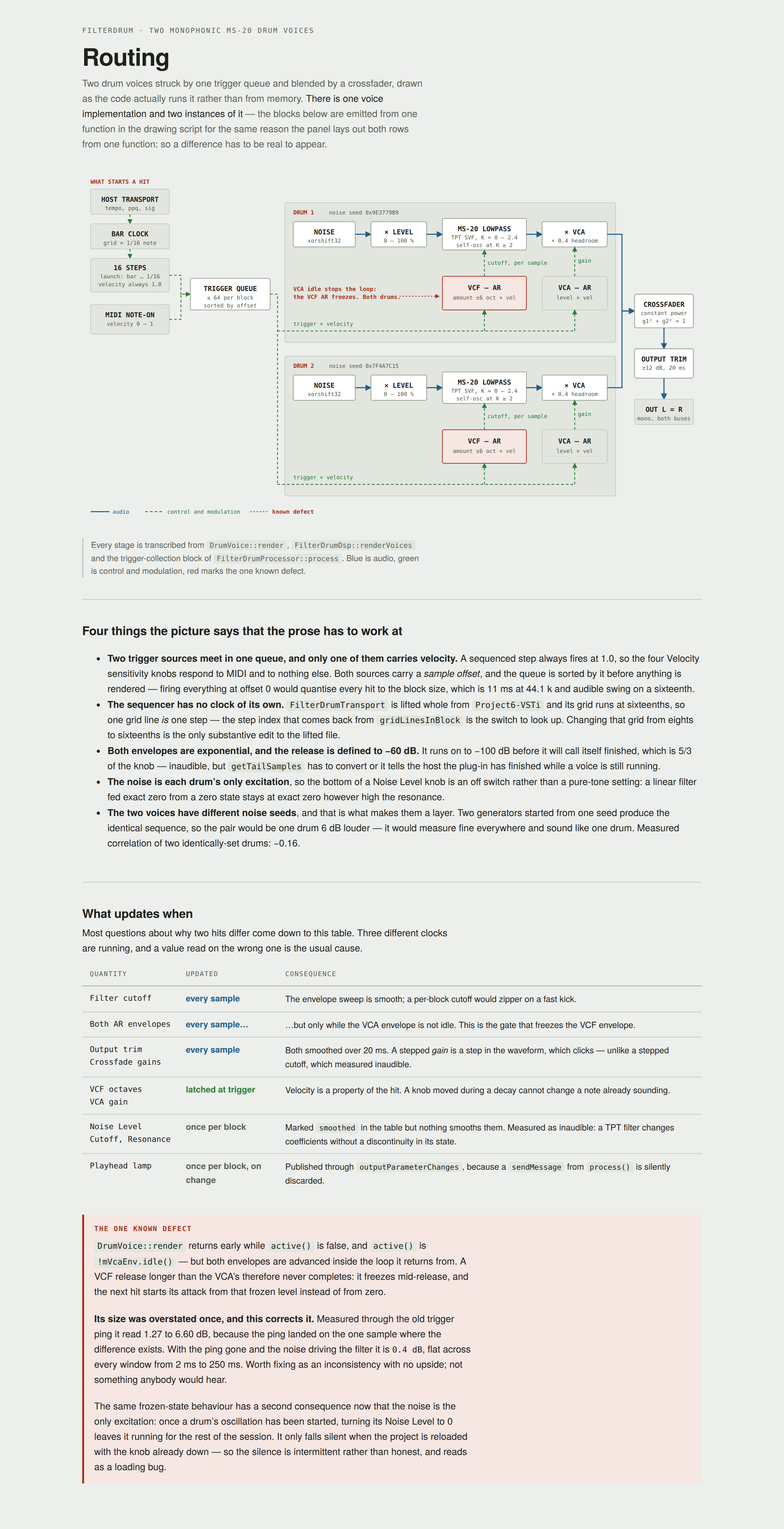
There is no oscillator and no trigger ping. Noise is each voice's only excitation, and the drum is the filter's own ringing. That one fact explains most of what the panel does.
- It models the later, OTA (LM13600) MS-20 revision — a two-pole lowpass whose damping the resonance feedback reduces, so it self-oscillates once K ≥ 2. The earlier Korg35 revision puts its diodes in the forward path and is a different sound.
- It is realised as a topology-preserving-transform state-variable filter, which exposes the bandpass signal — and that is where the diode saturator goes, because that is where the hardware's three back-to-back diodes sit, following the exponential diode law. The resonance is coloured; nothing else is.
- The diodes make the feedback implicit, so it is solved with Newton rather than a one-sample delay. Delayed feedback detunes the resonance at high cutoffs, which is what makes cheap emulations sound wrong at the top of the knob.
- The two voices use different noise seeds, which is what makes the pair a layer rather than one drum 6 dB louder.
Hits, not notes
- The envelopes are triggered, not gated. Note-off is ignored, because a drum has to sound the same whether the key was tapped or held — and a MIDI drum note is often only a couple of milliseconds long, so a gated envelope would cut every hit off at the note length. The Release controls decide how long it rings.
- Velocity is latched at the hit and scales the VCF and VCA amounts, each with its own sensitivity control.
- Monophonic, one voice per drum. A retrigger continues from the level the envelope is at rather than restarting from zero, which is what stops a fast roll clicking.
The sequencer
Sixteen steps, one bar of sixteenths. Switching Run arms it; it starts on the next line the launch division fires — bar, ½, ¼, ⅛ or 1/16 — so starting it mid-bar still lands on the grid. The transport's own clock does the timing; the sequencer has none of its own.
Both MIDI notes and sequencer steps carry a sample offset and are sorted together before anything is rendered, so a sixteenth is not quantised to the block size.
Right-click (or Ctrl-click) a step key to disable that step and the pattern gets shorter, for time signatures other than 4/4. With any step disabled, the place in the pattern counts from the start of the song, so it survives loops and locates.
Four things that are deliberate
These are the ones most likely to be reported as faults.
Noise Level at 0 is silence, not a quiet tone. The noise is each voice's only excitation, and a filter fed exact zero from a zero state stays at exact zero however high the resonance. The bottom of that knob is an off switch.
Note-off is ignored. The envelopes are triggered rather than gated, so a hit sounds the same however long the key is held.
Run arms the sequencer. It starts on the next line the Launch On division fires, so it can wait most of a bar before the first step. With the transport stopped it waits indefinitely, which is correct and looks exactly like nothing happening.
Sequenced steps play at full velocity. There is no per-step level, so the four Velocity controls affect incoming MIDI only.
Known gaps
- A VCF release longer than its VCA release does not finish. The voice stops advancing once the amplitude envelope is idle, so the filter envelope freezes mid-release and the next hit starts from that frozen level. Measured at 0.4 dB, flat across every window from 2 ms to 250 ms — an inconsistency with no upside rather than something anybody would hear.
Uninstalling
A .pkg never will, so:
sudo rm -rf /Library/Audio/Plug-Ins/VST3/FilterDrum.vst3sudo rm -rf /Library/Audio/Plug-Ins/Components/FilterDrum.componentsudo rm -rf "/Library/Audio/Presets/AE Cobley/FilterDrum"sudo rm -rf "/Library/Audio/Presets/A. E. Cobley/FilterDrum"— left behind by 1.0.1.0 to 1.1.0.0
The last two take the factory presets with them. Presets you saved
yourself live in your own ~/Library/Audio/Presets and are
untouched.